Hello Support,
I know it’s early in the process, but I wanted to mention that on macOS 26 Beta 1, though the Wallpaper panel will show the thumbnail for an installed screensaver, it does not yet work with the latest version build. The screensaver will appear in the “Others” listing as the last item, but selecting it does nothing to activate it.
Hoping to see the adoption of the latest macOS version well before its release.
Thanks.
Of course we hope to make iScreensaver compatible with macOS 26 Tahoe, but some things are out of our control due to Apple changes.
At the moment, with the first developer beta, we see these issues:
Screen Saver Settings Pane Missing
It appears Apple has removed the Screen Saver Settings pane from System Settings. A smaller, less functional settings is still there, but it’s hidden.
To change your screensaver:
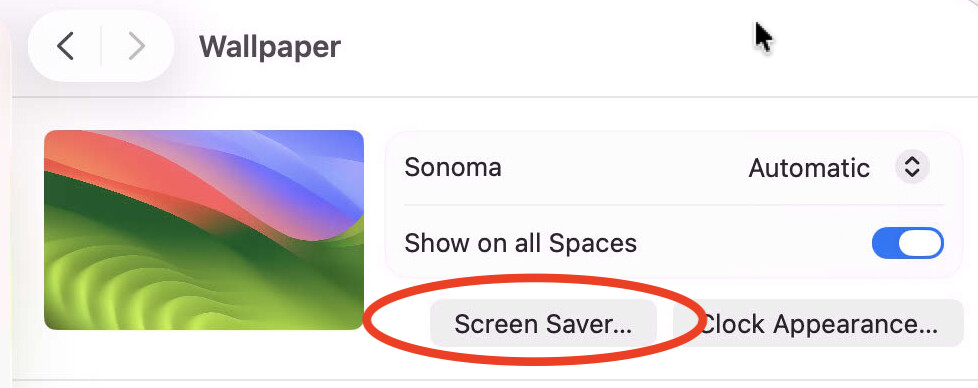
- go to System Settings / Wallpaper
- click the button labeled Screen Saver
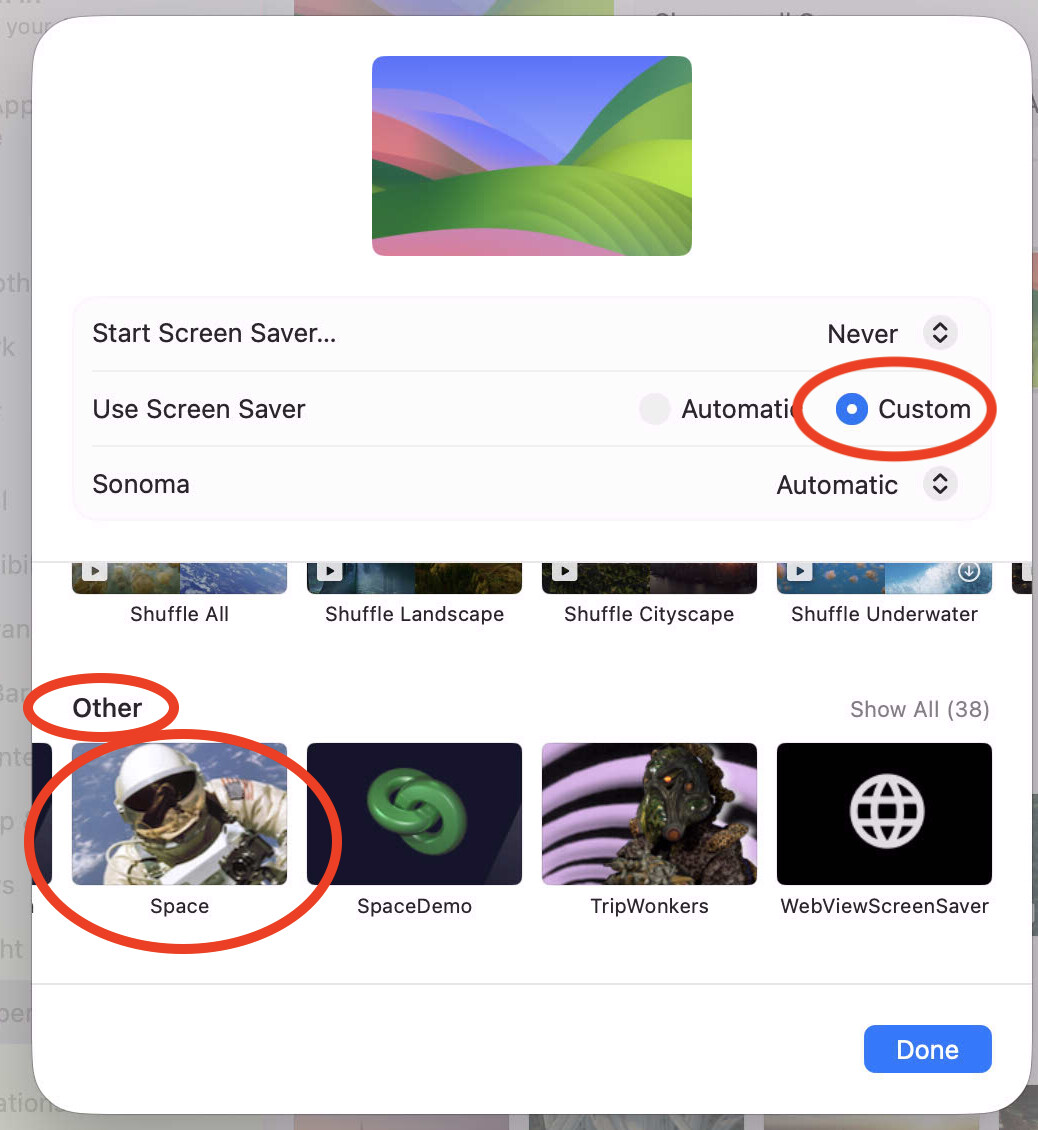
- This will open a small window (modal dialog, which can not be resized). In this window you will see the old Screen Saver options
- If you click the Custom button, and scroll to the very bottom, you will see any custom screensavers you have installed:
Installation Issues
- Upon installing a screensaver built with iScreensaver 6.9.0.1378, the screensaver will be properly installed; however it will not be properly selected as the active screensaver.
- Follow the steps above to select it by opening Wallpaper, choosing Screen Savers, clicking the Custom button, scrolling down to Other and selecting your screensaver.
- Once you have done so, the screensaver should run normally
Hello Support,
The GUI directions provided do not engage our screensaver built upon v6.9.0.1378. As macOS 26 is in beta, I’ll wait until things get resolved outside of manual manipulation.
Advise as needed, and thanks.
1 Like
Can you say more about what you mean that it doesn’t “engage”?
Do you mean:
- the screensaver doesn’t show up in the small Preview area in System Settings?
- the screensaver won’t run if you trigger it by clicking the “Preview” button
- the screensaver won’t run if you trigger it by using a HotCorner?
- the screensaver won’t run after the specified start time?
etc.
FYI: With macOS Tahoe 26 Beta 7, after installation of the iScreenSaver software, the Mac reverts to the built-in Tahoe screensaver. However, after a restart of the Mac, the custom screen saver kicks in when engaged (15 minutes). So far, it seems to work, but does require a restart. Before, it used to work right after the install, needing a restart is not a bad thing at this point. but if there is a way to remedy in the near future, I’m all ears.
There are numerous bugs in the Tahoe Betas, and we’ve been working with Apple to try to get them addressed, but at this time we can not recommend running any third-party screensavers under Tahoe – this includes iScreensaver-built screensavers, as well as any other non-Apple ones.
One of the bugs causes screensaver processes to be orphaned in a state where they may be using 100% CPU - so if you are testing, be sure to open up Activity Monitor.app, show All Processes, and be prepared to force-quit any errant LegacyScreenSaver processes.
We hope to see fixes from Apple in further Tahoe betas, but so far they have not made any progress.
FWIW, with the release of macOS 26 - Beta 8, the screen saver works without requiring a restart. At present, not encountering any runaway processes associated with the saver. Not to say they don’t exist, just haven’t seen it yet.
The release candidate (RC) version of Tahoe is available, and unfortunately we are still seeing numerous issues with Screen Savers.
At the present time, we do not recommend using macOS Tahoe 26.0 if you plan to use any third-party screensavers, including screensavers built using iScreensaver
We have run into similar issues where Apple broke screensaver functionality in the first release of a new OS. In those cases, Apple did eventually fix the bugs, but not until the .1, .2 or .3 versions. Therefore, we advise that all customers wait for macOS version 26.1, 26.2, or later in which Apple may be able to fix their bugs.
We are working on update to iScreensaver that attempts to get around some of the worst Tahoe bugs; please stay tuned for further announcements from us.
iScreensaver 6.9.1 has been released: iScreensaver 6.9.1 Released