I’ve followed the instructions to enable permissions for the screensaver, but when I open the permissions it shows the screensaver already present with permission already granted. The iScreen helper just says waiting for permission. I’ve tried to unload and reload screensaver with same results. I’ve tried to disable permission and re-enable permission with same results. When I use the screensaver it works fine, but I can’t get the HUD to work at all. If I make any movement on my trackpad, the screensaver just quits.
Welcome to the forums!
A few things to check:
- make sure you built your screensaver with the latest version of iScreensaver (6.9.1 or later)
- If you are upgrading from an earlier version, it’s possible you have “ghost” screensaver processes running. The easiest thing to do is simply reboot your mac, then try again
- Sometimes, immediately after installing the screensaver, we find that the HUD doesn’t work. However it will work a few seconds or a minute later. Our theory is that macOS is still doing security checks when you first launch it.
- If you have installed more than one screensaver, it’s possible for the OS to get confused (we think this is an OS bug). The solution:
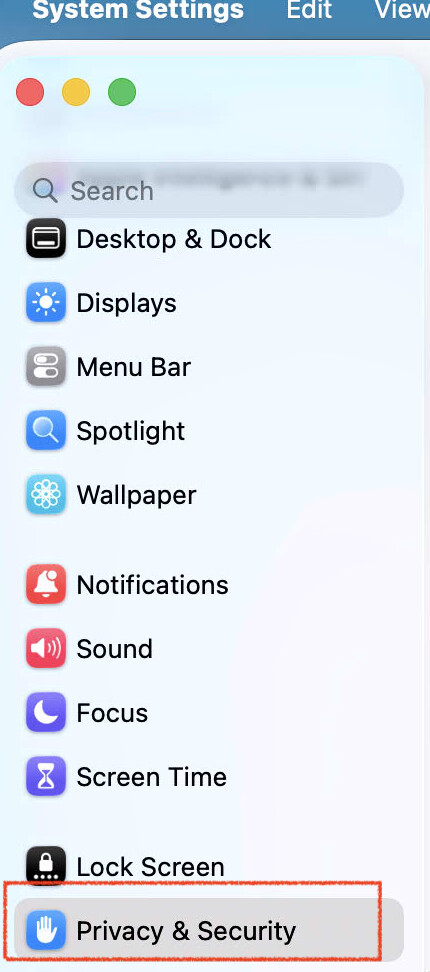
- go to System Settings / Privacy & Security / Accessibility.
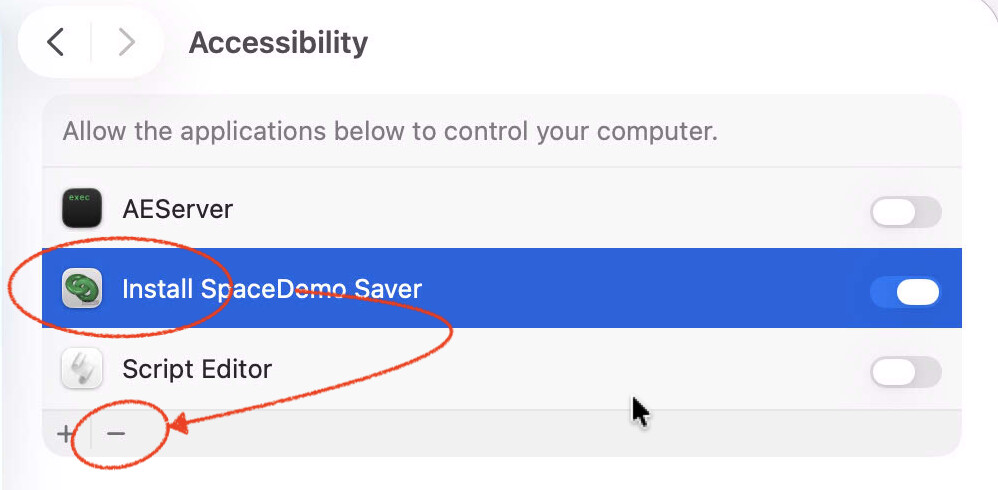
- Click on the screensaver app to select it, then click the minus button [-] to delete it.
- If you have more than one app showing up, delete them all.
- Reboot the mac, then try installing your screensaver again.
Can you say more about your system? is it an Intel mac or Apple Silicon? (M1, M2…)
@Lee did you ever get this solved? We have identified a bug in Tahoe which can make this more difficult.
If this happens to you please do this:
-
Open System Settings / Privacy & Security / Accessibility
-
If you have any screensavers there, for each one, select it, then click the Minus (-) button to remove it
-
Then, re-install your iScreensaver-built screensaver using the Screensaver Installer App.
-
During installation, you will get the requests to allow Accessibility permissions again, and it should work this time.